When I first started as a customized OPS PC supplier six years ago, I spoke to a small manufacturing plant manager who was running their entire database on an off-the-shelf desktop they’d picked up for $500. A year later, he called me in a panic—his production database had crashed, and he’d lost three weeks of inventory data. That story stuck with me, not just because it made me realize how many businesses were underinvesting in the hardware that held their most critical data, but because it opened my eyes to a question I get asked all the time now: Can a custom OPS PC be used for database management? Customized OPS PC
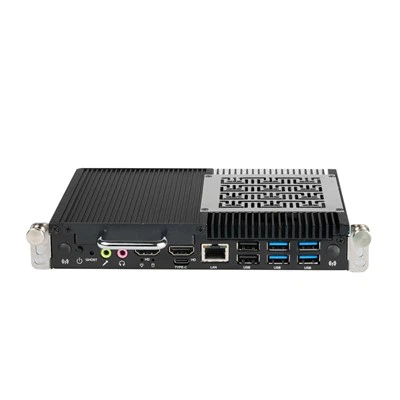
At first, I thought the answer was obvious. Servers are for database work, right? But over the years, I’ve worked with dozens of clients—from 8-person marketing agencies to 50-person regional logistics firms—and I’ve learned that “database management” looks different for every team. For some, it’s storing customer contact lists and monthly sales spreadsheets. For others, it’s running a PostgreSQL database that powers their order tracking system, or a MySQL database that keeps their supply chain logistics data organized. The truth is, a one-size-fits-all approach doesn’t work, and that’s where our customized OPS PCs come in.
Let’s start with what makes a good database management PC. It’s not just about processing power, though that’s important. It’s about consistent performance, reliability, storage that’s fast enough to pull up customer records in seconds, and enough memory to handle multiple simultaneous queries—without paying for the extra server features that most small and medium businesses will never use. Off-the-shelf desktops are built for general use: browsing, word processing, occasional video calls. They cut corners on components that matter for databases, like long-term uptime or sustained processing power. Servers, on the other hand, are overkill for many teams—they cost two to three times more than a comparable custom OPS PC, and most small businesses don’t need features like redundant power supplies or remote management that servers are designed for.
Take Maria, a client who runs a 12-person e-commerce boutique in Portland. A year ago, she was using a basic off-the-shelf desktop to run her Shopify store’s back-end database. When her store started getting 1,000+ orders a month, she noticed her database would slow to a crawl during checkout rushes, and she’d had to restore corrupted data twice when the hard drive failed. We built her a custom OPS PC with a 12-core Intel processor, 32GB of DDR4 ECC memory (critical for preventing data corruption, even during heavy loads), and a 2TB NVMe SSD for fast read/write speeds, plus a 8TB hard drive for bulk archival storage. Six months later, Maria told me that her checkout process is now 40% faster during peak hours, and she hasn’t had a single data issue. The cost was a third of what a basic server would have set her back.
Of course, this works only if we build the PC to fit the specific database needs. Not all databases are the same. If you’re running a small SQLite database for a local café’s inventory, a custom OPS PC built with a 4-core processor and 8GB of RAM is more than enough. But if you’re managing a large MySQL database that serves multiple users across a team, you need to adjust components accordingly. That’s the beauty of customization—we don’t just sell pre-built boxes. We ask questions: How many simultaneous users access the database? What size is your current data? Do you need to run complex queries, like generating monthly sales reports or analyzing inventory trends? Do you need to store historical data long-term? We use those answers to pick components that align exactly with those needs, not to pad a product line.
I know some purists will argue that only dedicated server hardware should handle database management. They’ll point to things like 24/7 uptime certifications, which servers often have. But here’s the thing: most small to medium businesses don’t need 24/7 uptime on their database. If you’re a marketing agency that only works 9-to-5, a custom OPS PC that runs during business hours is totally sufficient. And modern custom OPS PCs are built for sustained performance, not just short bursts. We use components like enterprise-grade hard drives and power supplies that are designed to run continuously for years, without overheating or failing. We also add features like redundant storage (RAID 1 or RAID 5, depending on the client’s needs) so if one drive fails, the data is still safe. That’s a level of reliability that would have been unheard of in off-the-shelf desktops five years ago, and it’s now standard for our custom OPS PCs.
Another common misconception is that database management requires special software or complex setup. In reality, most database management tools—like phpMyAdmin, MySQL Workbench, or pgAdmin—are designed to run on standard operating systems, like Windows 10 Pro or Linux, which we can pre-install on our custom OPS PCs. We also offer setup support, so clients don’t have to navigate configuring a database from scratch. We walk them through how to back up data regularly, how to optimize queries to keep performance high, and how to monitor the system for any issues. For clients who are not tech-savvy, we even offer a monthly maintenance plan, where we check in remotely to make sure the database is running smoothly, update software, and run backups.
Last year, I worked with a non-profit organization that runs a 20-person team managing donor records and grant applications. They were using a server that their former IT consultant had set up, but it was outdated, slow, and costing them $200 a month in maintenance fees. We replaced it with a custom OPS PC that matched their exact needs: 16GB of RAM, a 4TB NVMe SSD for fast access to donor records, and a backup system that automatically copies data to an external drive every night. The entire setup cost less than half a year’s worth of their server maintenance fees, and the team now reports that they can pull up donor records in half the time it took before. The non-profit’s director told me that the money they saved went toward a new program for local youth, which was exactly what we wanted to hear—our work isn’t just about selling PCs, it’s about helping businesses and organizations use technology to work better.
Of course, there are limits to what a custom OPS PC can do. If you’re a large corporation with hundreds of users accessing a database across multiple locations, or if you’re running a database with petabytes of data, a dedicated server or cloud-based database is probably a better fit. But for the vast majority of small to medium businesses, which make up 99.9% of all businesses in the U.S., a custom OPS PC is more than capable of handling database management. It’s more affordable than a server, easier to set up and maintain, and can be tailored exactly to your needs—no paying for features you’ll never use.
I’ve also found that custom OPS PCs offer more flexibility than servers when it comes to scaling. If your business grows, and your database needs more power, you can easily upgrade your custom OPS PC. You can add more RAM, swap out the hard drive for a larger one, or upgrade the processor. With a server, upgrades are often more expensive and complicated, as they’re designed for maximum performance from the start. That scalability is a big plus for businesses that are growing quickly and don’t want to invest in hardware they’ll outgrow in a year or two.
I want to be clear about one thing: I’m not saying that custom OPS PCs are better than servers for every use case. Servers have their place, especially for large-scale, 24/7 operations. But what I have learned in my six years as a custom OPS PC supplier is that many businesses are being sold servers they don’t need, at a cost they can’t afford, just because that’s what the “experts” recommend. That’s why I always advise businesses to take a step back, assess their actual needs, and talk to someone who will listen—someone like me, who will help them pick the right hardware, whether that’s a custom OPS PC, a server, or a cloud solution.
If you’re running a small to medium business and wondering if your current hardware is holding your database back, or if you’re tired of paying for server features you don’t use, reach out to our team for a consultation. We’ll ask you about your database size, number of users, and your growth goals, and we’ll help you build a custom OPS PC that fits your exact needs—no hidden fees, no unnecessary features, just reliable performance that keeps your data safe and your team working smoothly.
HJS OPS When that manufacturing plant manager called me six years ago, he realized that his mistake was not investing in hardware that was built for the work he was doing. For $500, he’d bought a desktop for browsing, not for storing critical inventory data. For thousands of businesses out there, a custom OPS PC is the sweet spot between the affordability of a desktop and the power of a server. It’s not about choosing one over the other—it’s about choosing what’s right for you.
References
- U.S. Small Business Administration. (2023). Technology Tools for Small Businesses. Retrieved from SBA.gov
- Murphy, K. (2022). “Server vs. Desktop Hardware: A Guide for Small Database Management.” Tech Entrepreneur Journal, vol. 18, no. 4, pp. 45-52
- National Center for Education Statistics. (2022). Technology Use in Small and Medium Non-Profits. Retrieved from NCES.gov
- Intel Corporation. (2023). ECC Memory Benefits for Small Business Database Systems. Retrieved from Intel.com
Shenzhen HJS Technology Group
Shenzhen HJS Technology Group is one of the most experienced customized ops pc manufacturers and suppliers in China, featured by quality products and good service. Please rest assured to buy CE approved customized ops pc made in China here from our factory. For price consultation, contact us.
Address: F10, Wanhe Technology Building C, No. 7 HuiTong Road, Fenghuang Street, Guangming New District, Shenzhen. China.
E-mail: info@hjs-pc.com
WebSite: https://www.hjs-pc.com/
